





Offer
New
Fawri Shop
Fawri Shop
QAR 152.43
Shipping and any applicable taxes are calculated at checkout.
Questions about this product? Chat with us →Lenovo Portable Bluetooth Speaker with FM Radio.
Brand Name: Lenovo
Display Size: 2.5"
Origin: Mainland China
Special Features: Radio Tuner
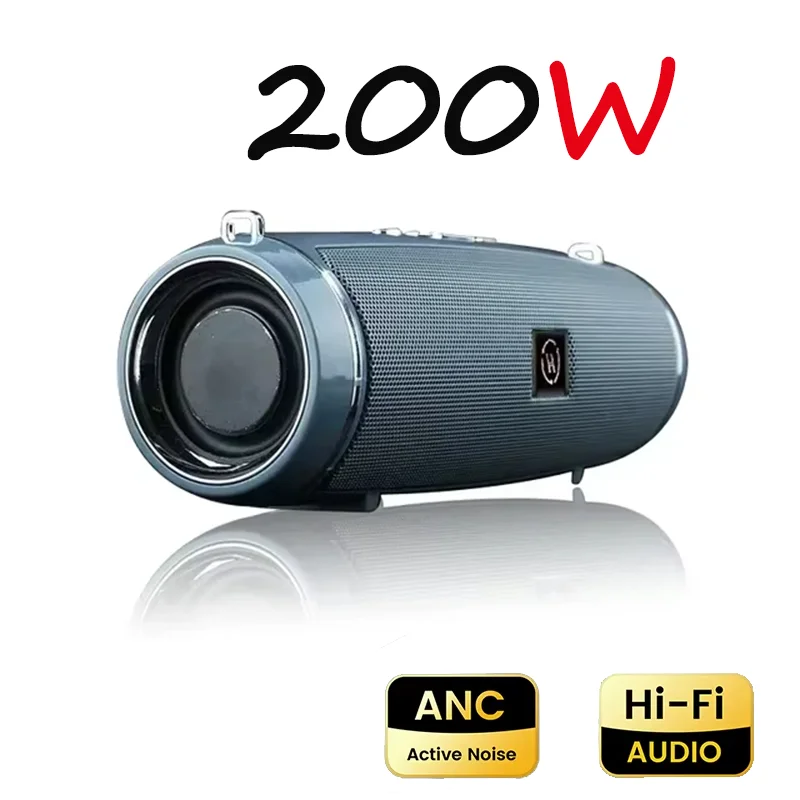
Lenovo FM Radio TF Boom Box Outdoor IPX7 Waterproof 200W Portable Bluetooth Speaker HIFI Pillar Stereo Subwoofer
Instruction:
First: the speaker needs to be fully charged, otherwise it will affect the normal use of the speaker
Second: the use of buttons
Power button: Long press the power button to power on or off
Bluetooth connection: turn on the mobile phone's Bluetooth and search and pair the speaker Bluetooth "H9"
PS: Please do not insert the audio cable when connecting to Bluetooth, otherwise the Bluetooth connection will fail.
Volume key "—": Long press the volume to decrease. Click to switch to the next song or the next program.
Volume key "+": Long press the volume up. Click to switch to the previous song or the previous program.
Phone key "☎︎": answer the phone
Pause key: Pause music or programs
Radio: Plug one end of the audio cable into the speaker, and leave the other side unplugged. Press the radio button to turn on the radio. Nothing happens when you press it once, please press it several times.
USB: Insert a USB flash drive with pre-downloaded music. Or other equipment
TF: Insert TF card
Notice:
First: The speaker will automatically lock if it is not suitable for a long time. In this case, you need to plug in the audio cable and press and hold the power button to turn it on.
Second: Please fully charge the speaker before using it.
Third: Please do not insert the audio cable when connecting to Bluetooth.
Fourth: Please insert the audio cable when using the radio function.


Fawri Shop


